User Experience

Infographic, Part 3 of 3: Things to keep in mind!

So now it's time for the third and final part of our article series on Infographics. Now that you know what infographics are and the value they can provide, it's time for you to start visualizing. If you haven't read the others you can find them here – part 1 and part 2.

It's not always easy to make something complicated understandable. That's why we'd like to give you a few tips that can be useful to keep in mind when you visualize data using infographics.
  1. Focus on the benefit. What is the data intended to do? What do you want to achieve and convey? Data should be presented in a way that makes it quick to consume. The purpose should also reach the right target audience and prompt them to act, thereby achieving the goal you've set

  2. Provide context. Infographics give a summarizing overview. In cases where the user wants more in-depth information, visible options to access further details should be available. This could, for example, be a link to read more or making the infographic available in the appropriate context from the start so that it has meaning

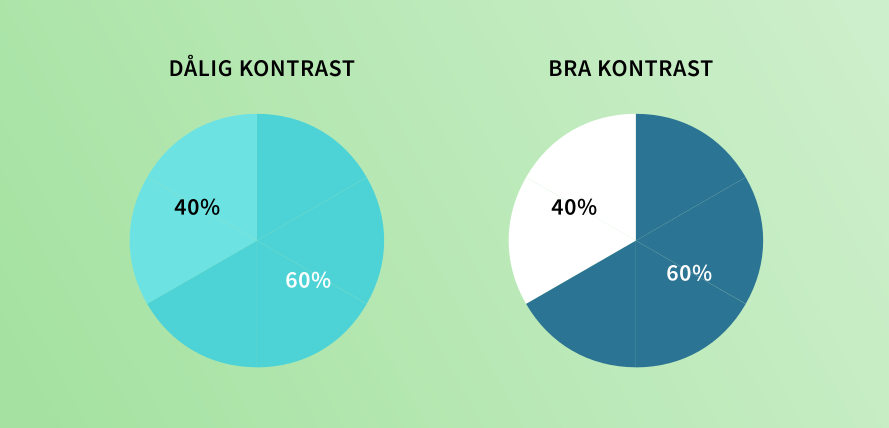
  3. Choose a limited color palette. Using color is a powerful communication tool when used correctly. A few selected colors are more visually appealing and make it easier to direct attention to different elements. Too many colors increase cognitive load and make it harder to process and absorb the information. You should also consider having sufficient contrast to ensure good readability. Feel free to follow the existing guidelines (WCAG) to make sure as many people as possible can access the content regardless of functional or visual impairments  


Here are some examples:

Poor contrast compared with good contrast

Many colors give a messy impression

A limited colour palette instills calm

Infographics in context

4 important lessons about infographics


To summarize what we've learned about infographics, we've compiled 4 important lessons:

  1. People are better at perceiving and understanding images than text. Infographics that add meaning to data can therefore make your information both easier to understand and easier to absorb

  2. Using infographics to present data such as numbers, processes or events helps your audience grasp your messages at first glance. You can effectively capture your visitors' attention

  3. Besides providing a quick overview, infographics spark curiosity. By putting the information in context it can become both distinctive and eye-catching. If you do it really well you can truly make your visitors sit up and take notice so they want to know more

  4. The threshold for sharing infographics is significantly lower than for a longer text. This way you can reach a broader audience

Do you want help optimizing your website

Now that you know a little more about information graphics, you can consider whether there is anything on your website that you can visualize. Are you able to capture your visitors' attention the way you want? Do you need help visualizing or optimizing your website? Contact us and we'll tell you more about how we can help you.

Contact us