Technology
Azure Search – Search service in the Cloud
We explain more about the benefits of Azure Search and the technology behind it.

Microsoft Azure is one of the industry-leading cloud platforms for automating and simplifying the deployment of an application. Here we explain more about what it is, who it suits and how your website can benefit from it.
To understand what Microsoft Azure means, you first and foremost need to understand what a cloud service is.
A cloud means using different data centers to store and distribute information to your users. The data centers are located in several geographic locations around the world. When your users then visit your website, the information is retrieved from the data center closest to them. This makes the information load faster and gives your users a better user experience. For many companies, cloud services have therefore become business-critical. As a digital agency we also encounter more and more companies that want to store their data in the cloud. This brings us to one of the most common cloud services, namely Microsoft Azure.
Microsoft Azure is one of the industry-leading cloud platforms for automating and simplifying the deployment of an application. Because it is a cloud service, it is a set of cloud technologies that together offer a range of features and components for storing data and executing applications. Data is stored in multiple locations and is only retrieved when it is needed or requested. What Azure therefore does is let its customers store and run their programs and files on its servers that are spread across the world. Below we explain more about Azure's three core components for storing and managing data, as well as the three services that Azure primarily combines and offers.
As the name suggests, the storage component takes care of all data storage. Because applications work with data in different ways, the storage component must be able to handle as many different kinds of requirements as possible. Azure therefore offers three different storage methods: blobs, tables and queues.
The compute part is what executes, or runs, the application. Azure can run many different types of applications and at the same time handle programs with many users. This is because it runs multiple copies across several servers, which in turn allows Azure to scale the application up and down as demand increases or decreases.
The Fabric area manages and monitors the software in the platform. Within each datacenter, servers are organized into what is called a fabric. Fabric consists of a large group of machines that are all managed by an administrative software called the fabric controller. The fabric controller keeps order in the cloud by keeping track of all resources in a network and ensures they are allocated properly.
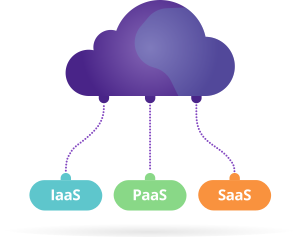
As a company it can be difficult to predict how advanced infrastructure you will need to manage in the future. For most companies it is also not a question of storing everything or nothing in the cloud. With its various services and components, Azure is an unusually flexible service with several advantages.
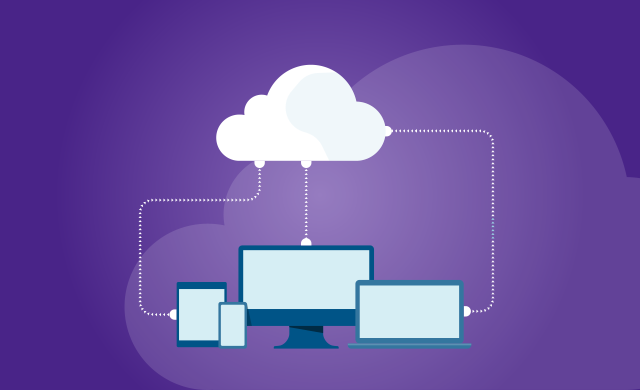
With our increased digital needs and usage, cloud storage is good for companies that have customers around the world. Azure can replace on‑premises infrastructure to a greater or lesser extent. In this way you can connect all your devices to the cloud via solutions that integrate with the existing infrastructure. This is especially suitable for companies that want to work with IoT, the Internet of Things. But really any company can use Microsoft Azure. Whether you are a smaller company in growth or a larger organization, cloud services like Microsoft Azure can meet or complement your needs, largely thanks to its scalability.
Scalability is above all an advantage if you either have very uneven load on your services over time, or if for various reasons you find it difficult to determine how much capacity you will need. An e‑commerce company that has 75% of its revenue around Christmas certainly doesn't want to pay to have full capacity year‑round. Or imagine a startup that stores data from its app in the cloud and it becomes a worldwide success. Then they can easily scale up storage. If they had their own servers this would have been problematic.
One of the advantages of Azure is that it is scalable and supports both smaller and simpler systems, as well as more complex solutions.
Just because a server or database is in the cloud doesn’t mean it has to be less secure than other solutions. Multiple data centers and several access points mean more places for outsiders to try to gain entry. At the same time, there is probably no solution that is completely risk-free. Azure itself has integrated security controls for all hardware and firmware components and additional protection against overload attacks (DDoS). Through relatively simple measures it’s also possible to strengthen and streamline your own security, making the cloud less risky.
If you scale up your cloud storage you should consider scaling up your security, such as optimizing firewalls and network solutions. Strong passwords, two-factor authentication, encryption and backups are other relatively simple measures. Having a clear security policy to control when, how and from where access occurs, or gaining better insight into where and how data is stored, can also be good measures. Penetration tests can be used to test and prevent security risks. Often people are hired to test security by attempting to hack the system. If these people manage to access your data, someone else outside may also succeed.
It’s simply a matter of planning and being prepared. The benefits of cloud storage are, after all, too great to let potential threats deter us. You can liken it to cycling with a helmet. You can still fall off the bike, but if you wear a helmet the risk of suffering serious injury is smaller. The same applies when you drive a car. Even though there is a risk of crashing, you don’t avoid taking the car if you need to travel a longer distance; you wear a seatbelt and drive anyway.