Content
4 tips to improve your web content
Here you'll find useful tips on how to improve your web content.

You may have heard of UX copy, UX writing or microcopy in some context. But what is it really, and how does it differ from "regular" copywriting? We explain the difference and give you useful tips.
UX design aims to create the best possible user experience. A large part of that experience is built on intuitive design with logical flows and functions. It is also about written communication in the form of labels and phrasing. What we write should capture the reader's interest, speak to our emotions and steer us in a particular direction. With small words we can make a big difference.
If we visit a website that has many spelling mistakes or expresses itself unnecessarily difficult and complicated, it affects our perception of what something is like. We scrutinize what we encounter — both consciously and unconsciously. We ask ourselves questions like "Is this really a trustworthy company?", "Do they actually deliver on what they promise?"
Everything we communicate affects our experience and perception of a brand, product or service. If a company cannot express itself in a way that I as a customer understand, how good are they really at helping me solve my problem?
Emotions make up a large part of the customer experience and good design simply needs good content. That's partly why UX copy has become increasingly important when we create and maintain websites and digital experiences. But what is really the difference between UX writing and "regular" copywriting?
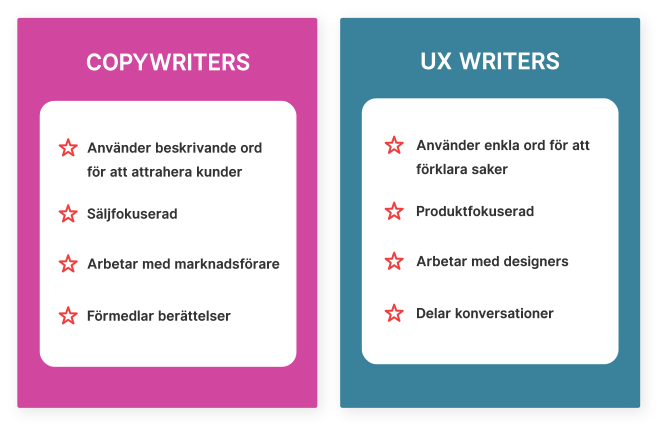
Copywriting is about leading or paving the way to some kind of action, whereas UX writing is meant to guide the user correctly and contribute to a better user experience. In short, you could say copywriting helps the business, while UX writing helps the customers and users.
While copywriters write texts intended to attract new customers to the website, UX writers work with existing customers or visitors who have reached the website and ensure they find their way. UX writing is therefore about the user experience (UX), whereas copywriting is more about marketing. Both are important parts of the customer journey and the company's overall content strategy.

With copywriting we create copy that informs, educates, persuades and sells. This can include material for a website, a brochure, direct mail or newsletters. The goal is to capture the user's attention and get them to perform a specific action. For example, signing up for a newsletter or clicking on an ad.
UX writing aims to help the user solve their problem. Through text and phrasing, the user is encouraged to take action. The UX writer makes sure to guide the user correctly and to design a good user experience.
With UX we can drive growth, build customer loyalty and strengthen brands. To make it a bit more concrete, we thought we'd give an example of a copy improvement that really made a difference. In Google's hotel search they changed the name of a call-to-action from "Book a room" to "Check availability" and managed to increase engagement by as much as 17%. They realised that users searching for a hotel room primarily wanted to check availability, not book a room right away. They simply weren't at the stage to want to book. The button's wording also didn't match what actually happened when users clicked through. The action didn't meet users' needs and expectations. By changing the wording, more people clicked through and engagement increased.

Watch the clip on YouTube (5:20 into the video)
How you phrase things therefore matters both for helping users find the right thing and want to click through, and also for the business itself. Poor UX copy can raise many questions. The result can be that customer service becomes overloaded or, in the worst case, the company loses customers. If you are unsure whether the copy you have chosen is right you can run an A/B test. Two versions are then pitted against each other and you choose the one that performs best. You can ask a colleague to read through your text or get help from experts. A website should also be kept alive. A wording that worked when you launched your website might not work as well five years later. In the same way that customers' needs change, the website's content must also be continuously developed to meet the changed needs. It's also about communicating more effectively.
A key factor in being able to create good copy for your website is empathy – understanding users' needs, their motivations and their feelings. To create the best possible digital experience, Design Thinking is a good method. Asking questions to understand and empathize with your users is a good tip to start with:
UX copy is, as you probably understand by now, an important part of both the customer journey and the user experience. It's about focusing on the user and how digital content is experienced and packaged. But what should you consider when writing? Here we have compiled some useful tips: